FINANCE PRO, the TradingView indicator for gold
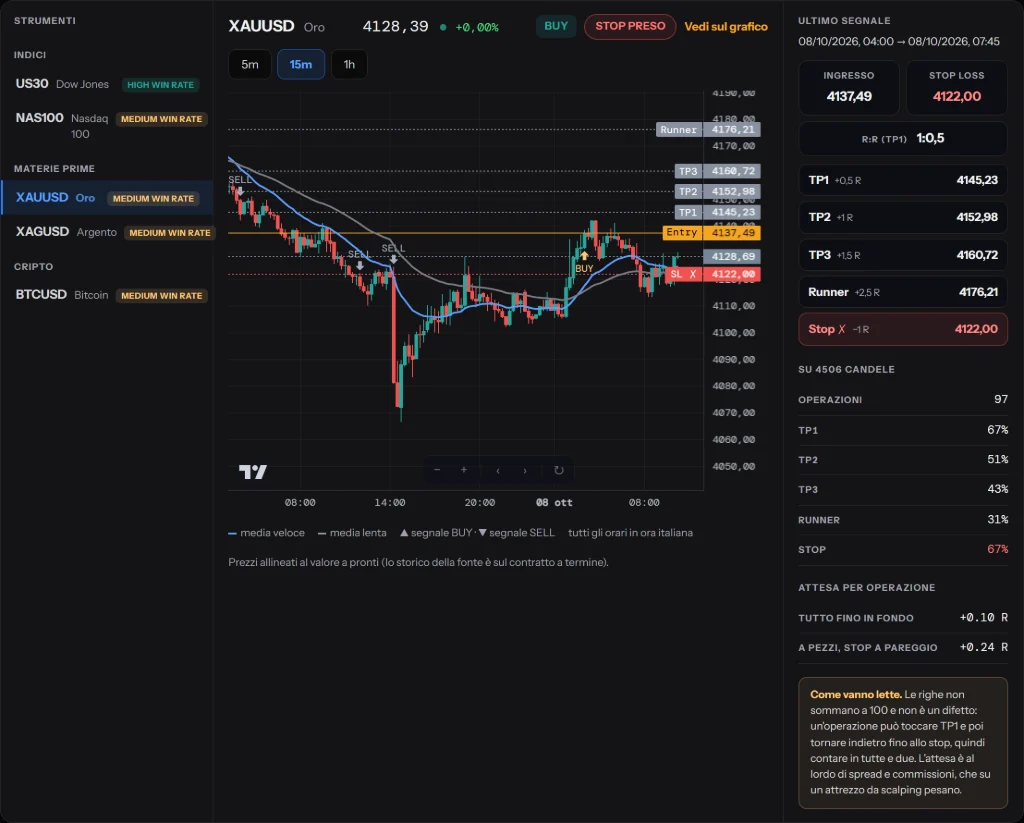
FINANCE PRO is Finance Link's indicator for TradingView. It marks where the market starts to expand and places targets and stops on the chart before you open the trade.
What it does, and what it does not
It does not predict anything: it reacts to price expansion. When the market stays sideways it produces signals that lead nowhere, and recognising that is still your job.
On which instruments
It is designed for gold (XAUUSD) and also works on the other instruments followed by the platform: US30, NAS100, silver and bitcoin.
Statistics in plain sight
In the platform every signal from the indicator is recorded with its outcome, stops included: you see on which instrument and timeframe it worked best, and where it did not.
The indicator's statistics
The table below comes from the record of the indicator's signals and updates automatically. For each instrument and timeframe it shows in how many trades the first, second and third targets were hit, and in how many the stop.
5 minutes
| Instrument | Trades | TP1 | TP2 | TP3 | Stop |
|---|---|---|---|---|---|
| US30 | 48 | 69% | 56% | 40% | 73% |
| NAS100 | 51 | 71% | 55% | 47% | 63% |
| XAUUSD | 197 | 70% | 53% | 37% | 72% |
| XAGUSD | 190 | 65% | 51% | 40% | 67% |
| BTCUSD | 319 | 65% | 47% | 37% | 70% |
15 minutes
| Instrument | Trades | TP1 | TP2 | TP3 | Stop |
|---|---|---|---|---|---|
| US30 | 21 | 67% | 52% | 48% | 62% |
| NAS100 | 21 | 76% | 71% | 57% | 57% |
| XAUUSD | 71 | 59% | 41% | 34% | 73% |
| XAGUSD | 73 | 67% | 55% | 48% | 66% |
| BTCUSD | 105 | 67% | 46% | 36% | 72% |
1 hour
| Instrument | Trades | TP1 | TP2 | TP3 | Stop |
|---|---|---|---|---|---|
| US30 | 6 | — | — | — | — |
| NAS100 | 8 | — | — | — | — |
| XAUUSD | 16 | 56% | 25% | 19% | 81% |
| XAGUSD | 17 | 71% | 47% | 41% | 65% |
| BTCUSD | 24 | 71% | 50% | 42% | 79% |
Source: the indicator's signal records, updated automatically.
A first target hit 70% of the time with a stop at 60% is not a contradiction: many trades hit the target first and then come back to the stop. That is why how you manage the trade after the first target matters, not just where you enter.
How to read it on the chart
When the price breaks out of compression the indicator draws the signal, BUY or SELL, with the entry price, the stop and three targets, plus a final part left to run. Past signals stay visible on the chart, so you can see how it behaved in recent weeks.
How to activate it
The indicator is included in the subscription. Once activated you find it in the platform, with step-by-step instructions to add it to your TradingView.
A record that cannot be edited
Many indicators only show the signals that went well, picked by hand. The FINANCE PRO record works the other way round: every signal is logged when it appears, and its outcome, target or stop, is written when it closes. Once a signal is in, it never comes out. The percentages you see count everything that happened, not a selection.
What TP1, TP2, TP3 and runner mean
Every signal has three targets at increasing distance and a part left to run, the runner. TP1 is the closest and is hit most often; TP3 and the runner are further away, hit less often but with a larger move. The percentages in the table show how many times, out of all recorded trades, the price reached each level, and how many times it hit the stop.
Frequently asked questions
Are the table's numbers a backtest?
No. Each row of the record is a signal logged at the moment it appeared and followed until it ended. It contains no trades reconstructed from the past: that is why it started empty and grows day by day.
Why do the statistics include the stops?
Because an indicator judged only on the targets it hits always looks better than it is. The stop is the cost of the method: without it, no percentage tells the truth.
Which timeframe is it best used on?
The statistics above answer better than any advice: compare the stop and target percentages across the timeframes of the instrument you are interested in. In general, longer timeframes give fewer signals and less noise.
Can I use it without knowing technical analysis?
You can, but it is the fastest way to use it badly. The indicator tells you where the market is moving, not whether that move makes sense in context: that is why the subscription also includes the courses, starting from the basics.
Pricing
One subscription with everything included: €39 for one month, €99 for three months, €179 for six months, €329 for twelve. You pay in USDT or USDC and it does not renew automatically.
The other tools
- Online trading course
- Gold trading signals
- Trading with AI
- AI chart analysis
- AI trading journal
- Trading backtesting
- Prop firm tracker
- Forex lot size calculator
- Forex sentiment
- AI trading strategy
Risk warning
Trading involves the risk of losing your capital. Finance Link's content is for information and education, not financial advice: Finance Link is not an authorised broker. Past results do not guarantee future results.